Google has introduced a new Android feature designed to make switching between compatible password managers easier. The new system allows users to transfer passwords and passkeys directly between supported services without first exporting their credentials to a separate file.
The change addresses one of the drawbacks of the older transfer process, which could require users to create an unencrypted text file containing their saved passwords. Passkeys also could not be transferred through that method, meaning users often had to set them up again after changing password managers.
Google says the new Android transfer system handles the migration within the operating system, while giving users control over which credentials are moved.
Transfer
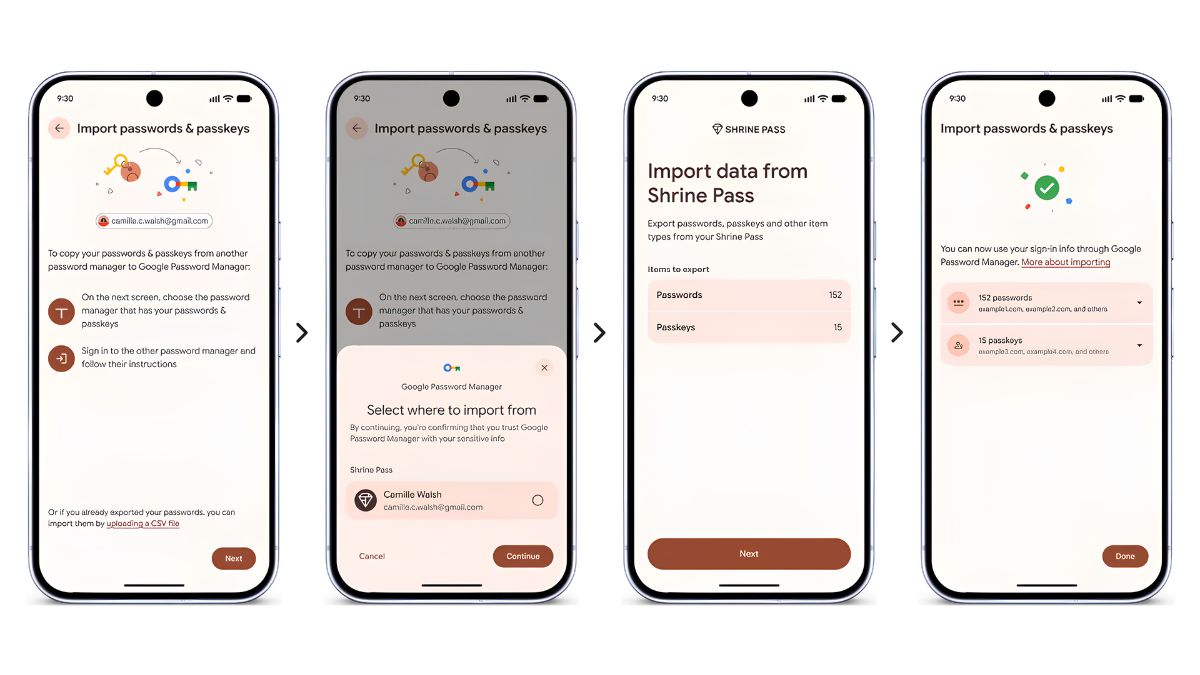
The new process starts from the password manager that a user wants to move to. Instead of creating a separate password export file, the destination app can ask Android to begin the transfer.
Android identifies compatible password managers installed on the device and displays them as possible sources. Users can then choose their existing password manager and continue the migration.
The selected password manager opens so users can review the credentials that are being prepared for transfer. After the user authorises the operation, Android transfers the selected passwords and passkeys to the new service.
Google says the transfer can take only a few seconds, although the actual time may depend on the number of credentials being moved and the services involved.
Passkeys
The ability to transfer passkeys is one of the more significant changes in the new system.
Previously, moving passwords between services could involve exporting them to a file. Passkeys could not be moved through the same process, meaning users changing password managers might have to create new passkeys for websites and apps.
Passkeys are designed to replace traditional passwords for supported accounts. They use cryptographic credentials and can provide a simpler sign-in process without requiring users to remember a password.
Allowing passkeys to move between compatible password managers can therefore make switching services less disruptive.
Security
The new approach also changes how credentials are handled during migration.
With the older method, users could have to export passwords into an unencrypted text file. Such a file could potentially expose sensitive credentials if it were left on a device or accessed by someone else.
Under Google’s new system, Android manages the transfer between compatible password managers instead of requiring users to create that separate file.
Users still need to authorise the migration through their existing password manager. This provides an additional step for confirming that the credentials should be transferred.
As with any credential migration, users should review the destination password manager and make sure it is the service they intend to use before approving the transfer.
Steps
Moving passwords and passkeys can be done through the password manager the user wants to switch to.
- Open the new password manager and choose its option to import or copy credentials from another provider.
- Allow the app to hand the transfer process to Android.
- Select your existing password manager from the compatible providers displayed by Android.
- Continue to the existing password manager and review the credentials selected for migration.
- Authorise the transfer in the existing password manager.
- Android will transfer the selected passwords and passkeys to the new password manager.
The exact wording and location of the import option can vary between password managers.
Services
Google says the new transfer system is currently supported by four password management services.
| Password manager | Support |
|---|---|
| Google Password Manager | Supported |
| 1Password | Supported |
| Bitwarden Password Manager | Supported |
| Dashlane | Supported |
Google also says additional password manager providers are expected to support the system in the future.
Google Password Manager can import passwords from another password manager through the new transfer flow. It also supports exporting stored passwords for users who need that option.
Availability
The feature is intended to make password manager switching less complicated for Android users. Instead of treating passwords and passkeys as files that need to be manually moved, Android acts as the intermediary between compatible password managers.
However, the transfer depends on support from both the source and destination services. Users whose password manager is not yet compatible may still need to use the provider’s existing migration options.
As more password managers adopt the system, switching services could become a more straightforward process. For now, Android users can check whether their current and preferred password managers are among the supported providers before starting a transfer.
The new system gives users a simpler way to move important sign-in credentials while also extending the transfer process to passkeys. By handling the migration through Android rather than relying on an unencrypted export file, Google is also changing how credentials are moved between supported password managers.